
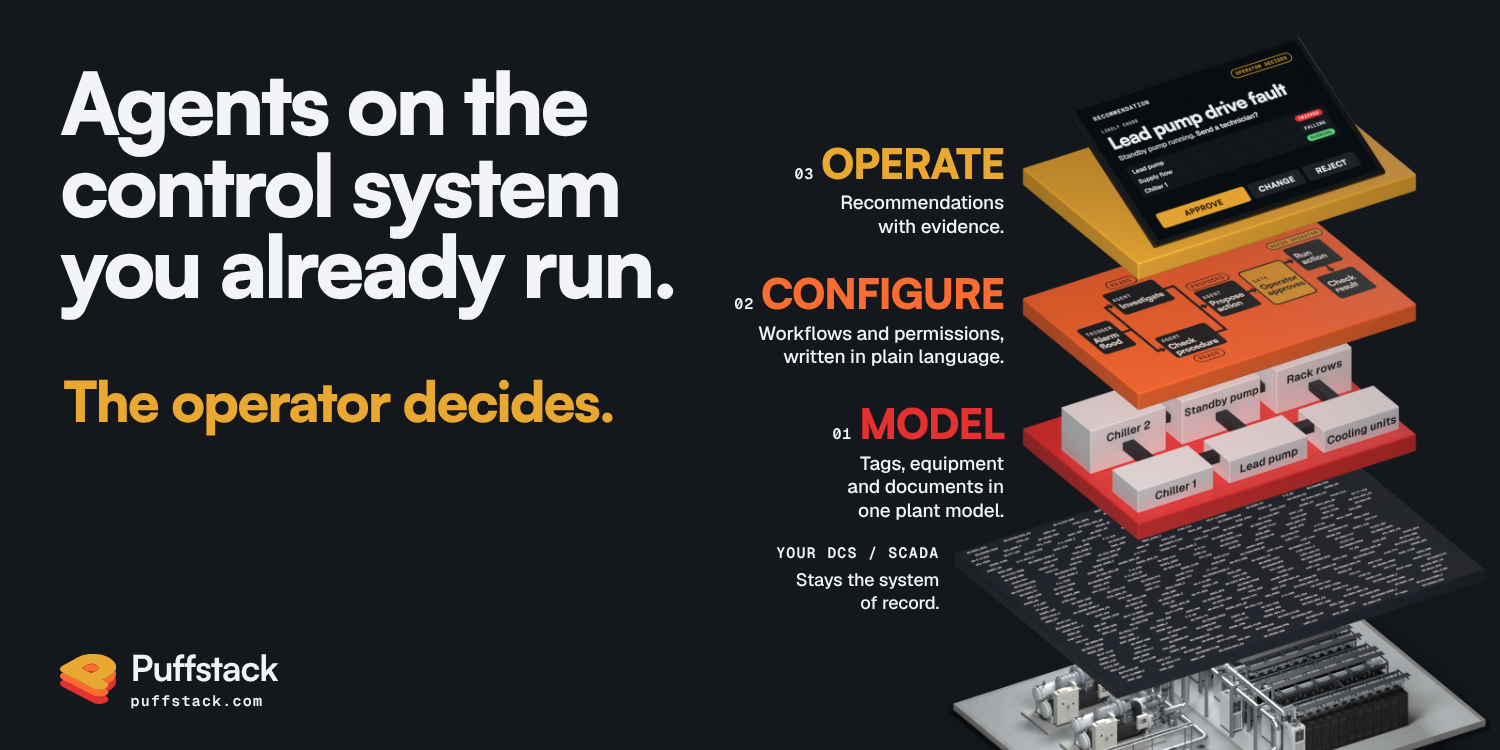
Figure 1. Three layers on the control system a site already runs.
A controls engineer types one sentence: when the lead chilled-water pump stops, show the operator what it took down and the next step in our procedure. Connect an AI agent to the site’s control system and it can read every tag on that loop. It still has to guess what the sentence means. The site’s systems can have five names for that pump, none of them is “lead”, and nothing in the connection says what the pump feeds or which procedure governs it.
Vendors now ship the connection. The Model Context Protocol gives an agent a standard way to call a system’s tools. When one SCADA platform opened early access to its MCP module in February 2026, the module shipped with no tools of its own. In September the same vendor said it would fold MCP into a framework for agents that each team designs, in place of a standalone module. Either way, each team decides what an agent may do. Deciding that, plant by plant, is where our work sits.
Most AI agents announced for control systems this year work inside one vendor’s system or on one job. Puffstack builds the layer above the control system a site already runs: every agent starts from a plant model an engineer has confirmed, works within permissions the site wrote, and ends at a recommendation the operator decides on.
What follows is our design of how a build runs on that loop, in the order the pieces go in. Three of those pieces have already run in our lab, and they carry their dates.
MODEL turns tags, equipment and documents into one plant model. CONFIGURE turns the sentence into a workflow with its permissions. OPERATE puts the result on the operator’s own screen, where the operator decides. All three sit on the control system the site already runs, a distributed control system (DCS) or SCADA, or in many data centers a building management system (BMS) with an electrical power monitoring system (EPMS). That system stays the system of record, and nothing is ripped out.
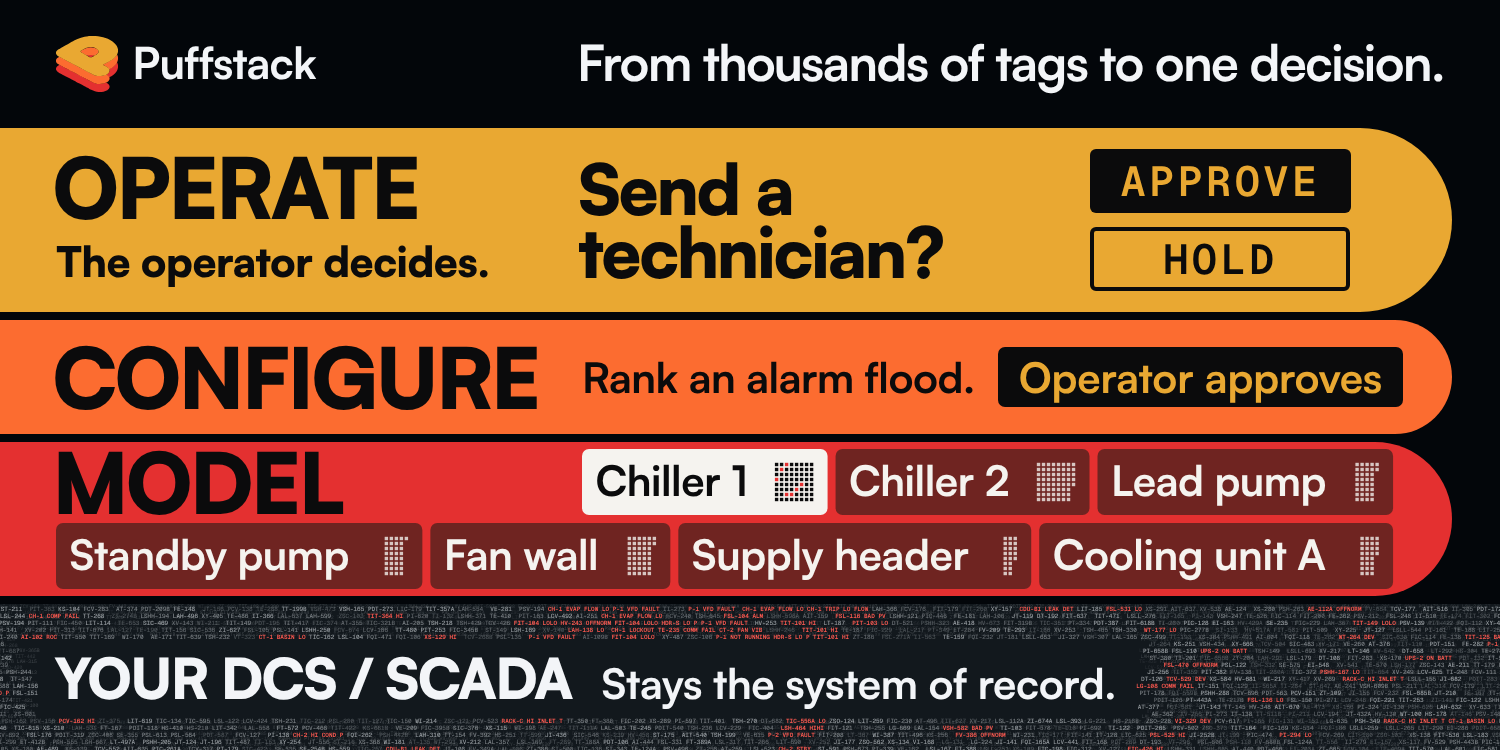
Figure 2. Thousands of tags at the base, one decision at the top.
01 MODEL: five names, one pump
The bottom layer builds the plant model: an asset model of how the plant is wired and what each tag means. It holds the equipment, the tags that report on it, the documents that describe it, and the links between them that an engineer has confirmed. The model starts with one signal, the lead pump’s run feedback, as each system on the loop spells it.
object      chilled-water pump 1

P&ID        P-1 (the pump)
controller  CHWP1_RUN_FB
OPC UA      nsu=urn:site:chw;
            s=CHW.Pump1.RunFeedback
BMS/SCADA   CHW/P1/RunFeedback
historian   CHW.P1.RUN_FB

meaning     run feedback,
            true = running
role        lead or standby, set
            by the duty selector
feeds       common discharge header
fed from    MCC-2, breaker 7 (EPMS)
documents   loop procedure, rev 4
            pump manual, rev B
approved    controls engineer
Figure 3. One pump in the plant model.
Each name is correct inside its own system. The P&ID names the pump, and the other four name its run feedback. OPC UA nodes “are unambiguously identified” by their NodeId, though the same standard lets a server change the namespace index in future sessions, so the plant model keeps the namespace URI. Nothing in that server knows the historian’s name for the same signal. The plant model holds the mapping, and a controls engineer approves it row by row.
“Lead” gets the same care. It is a role that moves between the two pumps when duty rotates, so the plant model records which pump holds it now and which signal says so.
The loop’s procedure and the pump’s manual attach to the same pump, each with its revision, so an answer can cite its page. Then come the links. The lead pump feeds the duty chiller through a discharge header it shares with the standby pump, and the chiller feeds the coolant distribution units. The motor control center that feeds the pump goes in from day one, because that link is how an agent tells a voltage sag from a pump fault. Corintel is designed to trace alarms along equipment links that an engineer has confirmed. We think the site’s P&IDs are where those links should start.
None of this starts from a blank page. ISA-5.1 sets out “a uniform means of designating instruments”, SCADA platforms already hold equipment templates and objects, and building and data center teams tag equipment with Project Haystack and Brick. The plant model starts from what those systems hold and adds what none of them holds alone: one record per piece of equipment across all of them, with links an engineer has confirmed.
This layer costs engineer time, and the build does not try to skip it, because the confirmations are where the plant’s own knowledge enters. A language model connected to your tags still does not know your plant. The plant model, confirmed by an engineer, holds that knowledge.
02 CONFIGURE: one sentence, one page
At the second layer, the engineer writes the workflow in plain language, and from it Puffstack builds the agent, the tools it may use and the rules for review. What the engineer signs is one page:
workflow  lead CHW pump stops
version   3

reads     CHW area alarms, events
          historian: run feedback,
          header flow, supply temp
          EPMS: MCC-2 power quality
          loop procedure, chiller
          alarm response

proposes  the chain from the
          stopped pump, with
          evidence on each link
          the next procedure step,
          with its revision

shows on  operator screen, beside
          the alarm summary, as
          advice, never as an alarm

approval  process actions:
          operator on shift
          shelve, suppress, out of
          service: per philosophy
          this page, its rules:
          controls engineer, MOC

never     safety systems: chiller
          safety controls, EPO,
          fire and life safety,
          refrigerant detection,
          electrical protection
          and transfer schemes

logs      each recommendation, its
          evidence, the decision,
          any correction

tests     past trips on this loop,
          scored by the engineer
          before use
Figure 4. The agent’s authority on one page.
Reading and proposing are broad, while changing anything is narrow and needs a named person. That split follows where trust sits today. Uptime Institute’s 2026 survey asked data center owners and operators which operational decisions they would allow an adequately trained AI to make. Of the 613 who answered, 71% chose “operational sensor data/alarm analytics”, 31% “controlling data center equipment” and 16% “configuration changes”.
The page carries a version, so a new rule or a wider read scope goes through the same review as the original, under the site’s management of change. One piece of this layer has run: in our lab on 1 June 2026, our configuration builder turned a plain-language request into reviewed SCADA configuration, end to end.
03 OPERATE: the operator decides
Then the pump stops. Its drive faults at 0:00, and at 0:04 the duty chiller trips on low flow. On the alarm summary the chiller’s trip arrives 11 seconds before the pump’s own alarm, which waits 15 seconds so that a normal start does not raise it (ASHRAE Guideline 36-2018, Addendum x, 5.20.17.6). The plant model knows the pump feeds the chiller, so the recommendation starts at the pump.
Any loop with a delayed status alarm sets this trap. On radio-polled well pads, where values arrive on the poll cycle, the summary’s order can drift further from the order of events. Where the drive fault is alarmed in its own right, as on a well-rationalized site, the summary already points at the pump and the agent’s job is smaller.
The recommendation appears on the operator’s own screen, beside the alarm summary. The lead pump stopped at 0:00 with a drive fault in the event log; the duty chiller lost flow through the discharge header and tripped at 0:04; the standby pump is running. It asks the operator whether to send a technician to the lead pump’s drive. The loop procedure gives the next steps: confirm standby flow, then send the technician. Each line links to its evidence: the event record, the alarm times, the confirmed link and the procedure page with its revision. A link no engineer has confirmed is marked as unconfirmed, with the name of the person who can confirm it.
The operator holds every action that changes an alarm’s state or the process. The safety instrumented system is never in scope. A cooling loop like this one has no safety instrumented system in the IEC 61511 sense, so its page names the safety systems that do that job here. Who may shelve, suppress or take an alarm out of service stays where the site’s alarm philosophy puts it.
Guidance on a European vendor’s SCADA screen has run. In our lab on 1 June 2026, Corintel’s alarm guidance ran end to end inside the screen of a running SCADA system. It answered from that platform’s own documentation. It can act too. In a staged lab run on 11 August 2026, Corintel traced a four-alarm cascade to its likely initiating cause and ran one action approved in advance. At a site, Corintel starts with advice: its agents read and propose, and nothing reaches equipment without the operator. Writes come later, one loop at a time, on a page that allows them.
This time the operator adds a step. On this loop the shift resets the duty chiller only after the standby chiller carries the load, and the procedure on file does not say so. The change is logged with the case. The controls engineer approves it as a step on the agent’s page, and it goes to the procedure’s owner as a proposed revision, through the site’s management of change. Until the revision is issued, the recommendation carries the approved step and notes the pending change. Once it is issued, the plant model attaches the new revision and the case joins the test set.
Every correction is drafted for review: as a rule on the agent’s page, a link in the plant model or, as here, a step on the agent’s page and a procedure revision for its owner. Some will not survive review. The ones the site approves are where the next recommendation starts. Reviewed rules handle the patterns a site already knows, and AI drafts new rules and investigates new cases.
Where the engineering goes
Count where the engineering went: five names and a role mapped to one pump, links an engineer confirmed, a page a reviewer signed, a procedure revised through the site’s own change process. A good controls engineer could script this one trace for this one loop in an afternoon. The work is keeping it right on every loop as duty rotates and procedures change. That work stays the site’s own engineering, written where an agent can use it and a reviewer can sign it.
For vendors and integrators: a partner build
A SCADA or DCS platform already holds much of a plant model: equipment templates and objects, the tag structure, the alarm configuration and years of the site’s history. That makes the platform a natural home for this layer, and a generic agent bolted on from outside reads the same tags with none of it. A partner build puts the three layers into what you ship, starting from what your platform already holds.
It starts with one workflow your customers already ask for, on a reference system of yours, through the interface you choose: your API, your OPC UA server or your MCP server. Your engineers confirm the plant model’s links, the agent’s page is written against your platform’s own permissions, and the recommendations appear on your operator screens. Puffstack brings the software for the three layers. Your customers keep their plant model, their page and their corrections inside the product they already run.
For an integrator, the same build fits each project. The tag mapping and loop knowledge your engineers produce at commissioning becomes the plant model an agent works from, and the page joins the handover documents.
Bring one workflow
Start with a count. Pick one pump on your site, write down every name your systems use for it, and ask which system knows they are the same pump.
Then bring us the work. Bring one workflow is a 30-minute working session for plants: bring one alarm flood, one report or one procedure, with the tags behind it, and we map it onto the three layers with you. You leave with the map: the names and links the workflow needs and the page that would govern it. Partner build is for SCADA and DCS vendors, OEMs and system integrators.
Puffstack runs in the cloud today. Hybrid and on-site options are on our roadmap. Wherever it runs, the agent is designed to reach what its page lists and nothing else, through an account the site issues and can close.
Both start with a message to Puffstack on LinkedIn.
Puffstack is a Calgary company that builds Corintel, an operator-guided AI orchestration layer above the SCADA a site already runs.